
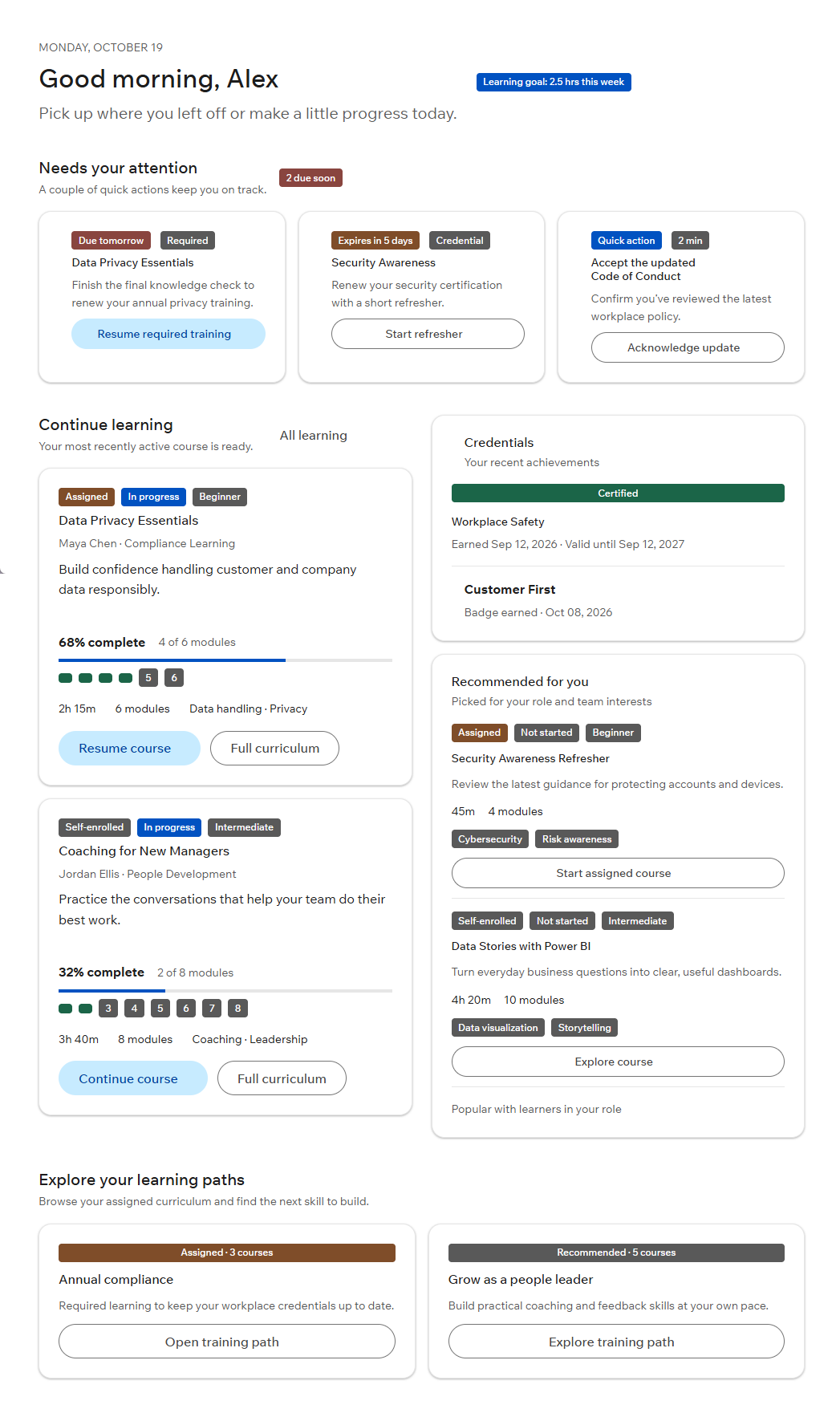
The Problem
The trainee landing page was built on outdated code, which added technical debt, and it didn't focus on what trainees need when they sign in. Trainees spent too long on the page before getting into a course or seeing urgent items.
Goal: Show trainees what needs their attention and get them back into learning.
Who It's For
| Persona | Description | Primary need |
|---|---|---|
| Trainee | Signs in to take assigned and self-enrolled training between other work | Get back into a course quickly and not miss deadlines |
| Manager | Assigns and recommends training to their team (secondary) | Make sure assigned training and updates are seen |
| System administrator | Runs the platform (secondary) | Communicate system events and required actions |
Discovery
- Reviewed the existing data models and defined a course model (status, assigned vs. self-enrolled, duration, level, skills).
- Reviewed support and bug tickets for related issues.
- Planned conversations with trainees about what they need first when they sign in.
Requirements
Drafted from the initial discovery, the requirements draft outlines the core features and functions as well as the data model needed, giving a starting point for building out a full set of needs.
The requirements specification breaks the page into epics (including urgent items, resuming courses, discovery and credentials) with testable acceptance criteria, including error cases such as a saved course position that can't be restored.
Design Decisions
-
Urgent first
"Needs your attention" sits at the top with a count, and each item has a single next action. With nothing urgent, the section hides or says you're all caught up.
-
Resume in one click
The most recently active course leads "Continue learning" and reopens exactly where the trainee left off, so the most common task takes one click.
-
Assigned vs. self-enrolled at a glance
Badges separate required and assigned training from self-enrolled courses so trainees can prioritize what their organization requires. Badge meaning is announced as text, not color alone.
-
Progress you can read
Course cards show percent complete, modules done out of total and a marker for every module.
Measuring Success
| Metric | Target | How It's Measured |
|---|---|---|
| Time to launch | Reduced vs. baseline | Sign-in → course launch |
| Time to task | Reduced vs. baseline | Time on the landing page before first action |
| Overdue required training | Reduced vs. baseline | % of assigned items completed after their due date |
What's Next
- Announcements: Show system events and messages from managers and admins without pushing urgent items out of view.
- Accessibility: Full keyboard navigation, visible focus states and screen-reader labels (WCAG 2.1 AA).